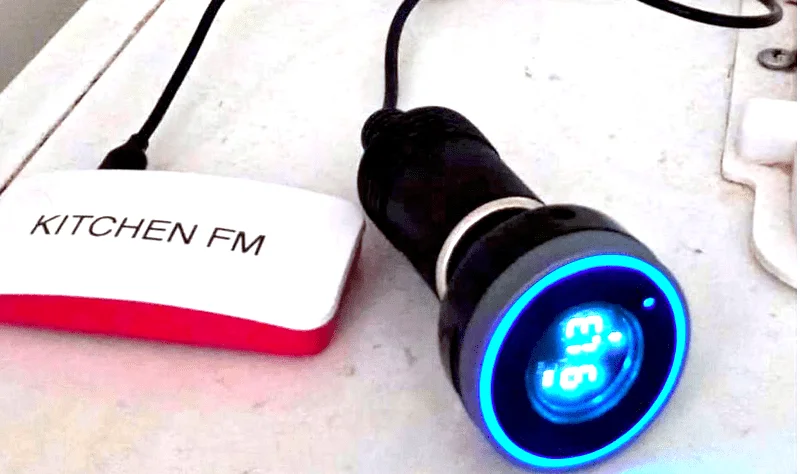
Six bash scripts, a $10 Pi, and a personal FM station
Trwmato's Pi-FM-Kitchen-Radio turns a Raspberry Pi Zero W and a $10 car Bluetooth FM transmitter into a 24/7 personal radio station — no soldering, no PCB, no GPIO. Six shell scripts handle playlist generation, RSS podcast downloading, content rotation, and Bluetooth routing, all managed by a systemd service that starts on boot. Full BOM is $30–50; build time is 2–4 hours. The project hit 550 Reddit upvotes and 148 Hacker News points within three weeks of its original post.
Difficulty: Beginner-to-Intermediate · BOM total: $30–70 · No soldering · No PCB · Source code on GitHub (Shell)
The premise is almost absurdly simple: a Raspberry Pi Zero W, a cheap car Bluetooth FM transmitter, and any kitchen radio you already own. No PCB, no GPIO wiring, no soldering iron. Six bash scripts run a 24/7 curated radio station that broadcasts your own mix of podcasts, hourly news, music, and station jingles — received on any FM receiver in the house, the same way commercial radio has worked for a hundred years.
Trwmato (Reddit user Important_Sector_905), a UK transplant living in New Zealand, built this to escape what he called a screen-time problem and a local-radio problem at once. New Zealand stations couldn't satisfy his appetite for British content and niche podcasts, and Spotify required a screen. 1 His solution: make the kitchen radio play exactly what he wanted, passively, without looking at anything.
Hackaday covered the project on June 9, 2026 under the headline "Custom FM Radio Station Powered By Shell Scripts." 2 Reddit gave the original post 550 upvotes at a 98.6% ratio, and Hacker News independently surfaced it to 148 points and 55 comments. 1 3 The author's own framing is worth keeping:
"I'm new to both Linux and Raspberry Pi so I've probably developed some hacky ways of making things work. Built using bash as I don't know anything else."— Trwmato, GitHub README 4
That's not false modesty — the project genuinely runs on nothing but shell, and it works.
What makes this stand out
Most Pi radio projects take one of two routes: they run an Icecast streaming server (requires an app or a browser on the listener end) or they use a dedicated FM transmitter HAT wired to the GPIO (requires hardware assembly and licensing scrutiny). This project does neither. The Pi pairs over Bluetooth to a commodity 12V car FM transmitter — the same £10 gadget you'd use to play phone music through an old car stereo. The transmitter then rebroadcasts on whatever FM frequency you tune it to, and the kitchen radio picks it up a few metres away.
The coverage radius of a car-type FM transmitter is a handful of metres, not a city block. That keeps it entirely in personal-use territory. As Korben.info's Vincent Lautier put it: "No need to worry about legality — the transmitter carries a few metres, like the ones in cars, far from the pirate radio that blankets a whole neighbourhood." 5
The other thing that stands out is the content model. This isn't just a music shuffler.
make_playlist.sh generates each play session from a configurable block sequence — the default being JINGLE → NEWS → MUSIC → JINGLE → SHOW → MUSIC → JINGLE → NEWS → MUSIC → SHOW → MUSIC → JINGLE → MUSIC → SHOW → MUSIC → EGG — where each block type draws from a different content directory. 6 7 NEWS slots pull the latest BBC or RNZ hourly bulletins downloaded by podget. SHOW slots grab your subscribed podcasts, prioritising fresh episodes and falling back to a backup library when the queue runs dry. EGG slots play hidden audio oddities ("Easter eggs") you drop in a dedicated folder. The whole thing feels like radio because it's programmed like radio.Bill of materials
No distributor order required beyond your existing channels — every part here ships from Amazon or AliExpress in a day or two.
| Part | Role | Qty | Est. cost |
|---|---|---|---|
| Raspberry Pi Zero W | Main compute; runs Raspberry Pi OS + all scripts | 1 | $10–15 |
| Bluetooth FM transmitter (12V car type) | Converts Bluetooth audio to FM broadcast | 1 | $10–15 |
| microSD card (16 GB+, 32 GB recommended) | OS + podcast/music storage | 1 | $5–10 |
| Micro USB power adapter (5V/2A) | Powers the Pi Zero | 1 | $5–10 |
| FM radio receiver | Receives the broadcast | 1 | $0 if you have one; $10–20 new |
Core new-purchase total: $30–50. If you already own an FM radio (which is the point — most kitchens do), the transmitter and Pi are the only real expenses. 4
No NAS is required for a basic setup — the Pi itself can hold a music library on its SD card, or you can mount a Samba share from any machine on your network.
samba is listed as a dependency in the README for exactly this use case.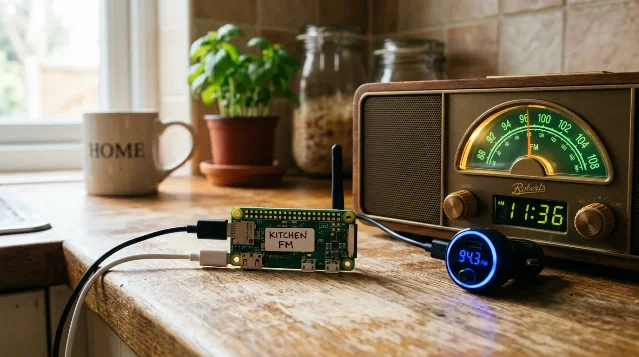
Signal path and "schematic"
This project has no circuit schematic in the traditional sense — there is no GPIO wiring, no breadboard, no custom PCB. The signal path is:
RSS feeds / local files →
podget download → bash scripts → cvlc (VLC command line) → BlueALSA → Bluetooth → FM transmitter → FM radioThe system-level "wiring" is the Bluetooth pairing between the Pi and the transmitter. Once that bond is stored on the Pi,
current_bt_speaker.sh detects the transmitter's MAC address at startup and radio_loop.sh routes audio to it via BlueALSA (the Bluetooth ALSA backend). 8 9The directory layout is the other half of the "schematic." A
~/radio/ tree holds 12 subdirectories that define what goes on air:~/radio/
dailyshow/ podcasts: play once, then delete
weeklyshow/ podcasts: play once, then archive
backupdaily/ fallback pool — up to 25 files
backupweekly/ fallback pool — up to 50 files
news/ hourly bulletins from BBC/RNZ
music/ your music library (or Samba mount)
maintenance_music/ plays while podget runs
jingles/ station idents/transitions
eggs/ hidden audio surprises
playlists/ generated .m3u files (runtime)
logs/ podget and script output
config/ playlist_blocks, podcast URLs
scripts/ all six .sh filesThe six scripts
Cargando tarjeta de contenido…
Each script has a single responsibility. Together they implement a simple state machine: play → maintain → play.
| Script | What it does |
|---|---|
radio_loop.sh | Main loop: waits for Bluetooth connection, calls make_playlist.sh, plays the playlist with cvlc via BlueALSA, then hands off to maintenance.sh |
make_playlist.sh | Generates a .m3u by reading config/playlist_blocks and randomly picking one file from each block's content directory, avoiding repeats within a session |
maintenance.sh | Runs podget to download new RSS episodes, calls curl_retry_failed_podget.sh for any failures, cleans up old files, calls cleanup_show.sh, then returns to radio_loop.sh |
cleanup_show.sh | Enforces content quotas: daily shows deleted after play (max 5/feed kept); weekly shows moved to backupweekly (max 8/feed kept); backup caps: 25 daily, 50 weekly |
curl_retry_failed_podget.sh | Reads podget's error log, re-fetches failed URLs with a browser User-Agent; handles mp3, m4a, aac, ogg, opus |
current_bt_speaker.sh | Scans for a trusted, connected Bluetooth device and returns its MAC address for the audio routing commands |
A
systemd service file (radio.service, Type=simple, Restart=always) ensures the whole thing starts on boot and restarts after any crash without manual intervention. 10One known rough edge worth calling out:
podget sometimes fails on BBC feeds, particularly when they use generic filenames like media.mp3. The curl_retry mechanism usually catches these, but the author notes that occasional duplicate episodes slip through — "not enough to be annoying in my experience." 4Reproduction difficulty
Rating: Beginner-to-Intermediate.
The hardware side is genuinely beginner territory. You flash an SD card, plug in a USB charger, and pair a Bluetooth device — the same three steps as setting up any Pi project. There is no soldering, no level-shifting, no custom PCB.
The intermediate label comes from three specific tasks:
- BlueALSA configuration. Getting Bluetooth audio output reliably routed through ALSA on Raspberry Pi OS is the most common sticking point in Pi audio projects, and the author is candid about it: "Getting Bluetooth to work is very annoying — I'd consider removing all the bluetooth functionality and outputting to a USB DAC." 4 Budget an hour for this; search "bluealsa raspberry pi" for current community solutions before starting.
- Systemd service setup. Copying a
.servicefile and runningsystemctl enableis straightforward once you've done it once. First-timers should budget 20–30 minutes to understand the unit file syntax. - RSS feed curation. The
podgetconfiguration expects a specific format for feed URLs. Most public podcasts and BBC/RNZ bulletins work without issue, but private or Patreon feeds require token URLs.
Estimated build time: 2–4 hours for a working station; add 1–2 hours to configure your RSS subscriptions and organise a music library. The author built this as a Linux/Pi newcomer, which is a meaningful signal about the ceiling.
No special tools needed beyond a laptop, a microSD card writer, and a phone or another Bluetooth device for initial pairing tests. 2
Community reception
Cargando tarjeta de contenido…
The numbers are unusually strong for a project with no visual demo video and no custom PCB. Reddit's r/digitalminimalism gave it 550 upvotes at a 98.6% ratio with 39 comments, most expressing straight admiration or sharing their own FM transmitter experiments from the early MP3 era. 1 One commenter, PunkRock_Platypus, summarised a common reaction: "Was forwarded this by a friend, awesome project!" 1
On Hacker News, dredmorbius — the submitter — wrote: "I particularly like the idea of curating my own set of podcasts to play as I want to schedule them." 11 The thread drew two independent accounts of builders who had done similar things years earlier: tombert described writing an Erlang-based Icecast server for a comparable use case, 12 and EvanAnderson recalled using a low-power FM transmitter to synchronise music across a wedding venue in 2007. 13 Those responses suggest the project hit a nerve with a specific cohort of builders who had wanted exactly this but never shipped it.
Hackaday noted the extensibility angle: "We could see this as the start of a cool project to have a 'radio station' for a school, organization, or company. It is easy to understand and modify." 2
The GitHub repository had 111 stars and 5 forks at time of research — modest by viral-project standards, but the project is less than a month old and has no LICENSE file yet, which may be limiting forks. 4 If you adapt the code, treat it as rights-reserved until the author clarifies.
Build resources
- GitHub repository: trwmato/pi-fm-kitchen-radio — all six scripts, systemd service file, and directory structure documentation
- Hackaday writeup: Custom FM Radio Station Powered By Shell Scripts
- Original Reddit post (includes author Q&A in comments): r/digitalminimalism
- BlueALSA on Raspberry Pi: the
bluealsapackage in the Raspberry Pi OS repos is the current path; search the Raspberry Pi forums for "bluealsa setup" for the most current pairing commands
Cover image from: Custom FM Radio Station Powered By Shell Scripts — Hackaday
Fuentes de referencia
- 1I replaced Spotify with a homemade FM radio station — Reddit
- 2Custom FM Radio Station Powered By Shell Scripts — Hackaday
- 3Hacker News — I replaced Spotify with a homemade FM radio station
- 4GitHub — trwmato/pi-fm-kitchen-radio
- 5Il s'est construit une station de radio FM sur mesure avec six scripts bash — Korben.info
- 6scripts/make_playlist.sh — GitHub
- 7config/playlist_blocks — GitHub
- 8scripts/current_bt_speaker.sh — GitHub
- 9scripts/radio_loop.sh — GitHub
- 10systemd/radio.service — GitHub
- 11HN comment #48448364 — dredmorbius
- 12HN comment #48448232 — tombert
- 13HN comment #48447100 — EvanAnderson
Añade más opiniones o contexto en torno a este contenido.